PLUME FLOWERS FINISHED
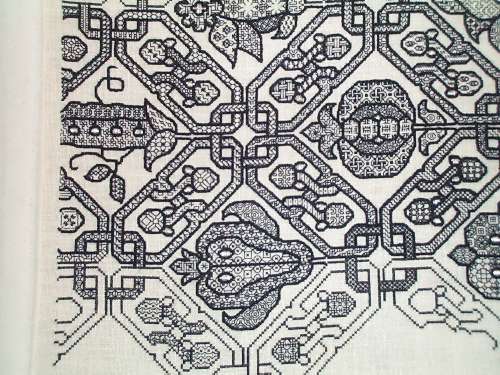
Work has a nasty way of eliminating any discretionary time whatsoever, but five minutes here and 20 minutes there, I have finally managed to finish the plume flower double running strip:

On to the next band of lettering, and on to thinking about what to do after that one is done. The current rate of production coupled with a workload that promises to double again in the coming month will give me ample time for that bit of consideration.
I hope to resume my explorations into charting software possibilities. I’ve got an itch to publish more patterns (including the just-completed strip), but without tools and time it’s just not happening.
STITCHING AND VISUAL DENSITY
Charlotte asks about the colors of the bands on the Clarke’s Law sampler. She says that each successive band looks lighter than the one before. I answer:
So far I’ve used only two colors of embroidery floss – DMC Red #498 and DMC Black #310. The top band was done in long-armed cross stitch, using two strands of red. Long armed cross stitch produces a particularly dense and raised texture.

Outlines on the grapes band were worked in double running stitch using two strands of the red, but the background grid filling was done in one strand – also in double running.

The current plume flower band is worked in double running using just one strand.

Between the relative densities of the various source patterns and the density of the working methods I’ve ended up with the progressively lighter look for each band even though all are worked using the same thread.
My plan for the rest of the bands is to do more of the double running work, choosing bands of different visual densities and working some but not all of them voided (with a background fill, but not necessarily solid). The next one will probably be somewhat closer in look to the grapes panel, but in between that and the current band in darkness. I will alternate bands of various densities with the black lettering. I’ve used plain old cross stitch for both the letters and the red embellishing squiggles that loop around the letters. If you compare it to the long armed cross stitch snippet above you can see the difference in coverage between the two.

When all of the lettering is done I’ll consider working more long armed cross stitch. Depending on how much room is left on the cloth, I might just go for broke with one massively large pattern, working it voided, so that the piece has a nice dense anchoring segment at the bottom. Or there might be a couple of bands of progressively darker stitching leading up to it. I haven’t chosen the patterns yet and I’m not sure exactly how much room I’ve got, so you’ll have to stay tuned to see how it all works out.
To answer Ellis – the reason you can’t see any lines drawn on on the linen for stitching over is because there aren’t any. This piece is done on the count. I’m using the weave of the linen as my guide, copying patterns drawn out on graph paper, with each grid of the graph paper corresponding to square of 2×2 threads.
To answer Marya – if my pattern contains a straight line that spans two or more graph units I do not make one big stitch over all of them. I make an individual stitch for each grid unit, even if they are all in one straight line. This keeps the work neater and more true to the graphed original. Long stitches are also more likely to catch on things.
To answer [anonymous] who noted that all of these patterns seem to rely on just 90 and 45 degree angles – yes, you’re right. I can’t rule out totally that diagonals over a 1×2 grid unit weren’t used (30/60 degrees), but so far I haven’t found a historical piece that used them in this type of pattern. It’s possible that some in-filled blackwork diaper patterns (the dark outline, different geometric filling variant seen below) used stitches at those angles, but I haven’t had the luxury of examining enough historical works close-up to make that determination. Lots of modern blackwork does use those angles. But for me, I’ll stick to the orthodox and limit my design to 45s and 90s.
BAND THREE ALMOST DONE
Apologies to the person out there anxiously awaiting the rest of my charting review series. I’ve had a serious attack of work obligations that has eaten into all time not spent sleeping. Even family maintenance has been scaled back. Blogging and research for blogging is right out. But for all of that, I do reserve to myself a half hour in the evenings for de-stressing. So I do have some progress to show on my Clarke’s Law sampler:

When this band of plume flowers and branches is done I do the next line of text. At the current rate of life-obfuscation, I won’t have to worry about picking the next band pattern for weeks yet to come.
Sigh.
STILL STITCHING
I’m still working on my round-up of charting software reviews. I’ve got three or so more dedicated programs to try, and then I’ll attempt to bend standard graphics programs to my use. In the mean time, work eats at my life. I did get a little bit of time to stitch while we were watching the Olympics yesterday. Here’s the result of that hour plus the prior week’s worth of dinking around on my Clarke’s Law sampler:

Complex, but in a blocky, heavy-torso, post Renaissance way, kind of delicate. It makes the grape border above the line of text seem meaty by comparison. This strip is mostly reversible. Some small bits like the diamond in the center of the plume/flower’s base and the bark texture lines are discontinuous, and I didn’t bother to either start or finish off my threads invisibly. But with a bit of tinkering to norm the non-attached bits of detail, there’s no reason why this pattern couldn’t be worked totally two-sided.
For those of you who are thumbing through TNCM looking for this one, it’s not in there. It’s part of the set I’m grooming for the next book. If the investigations into a feasible charting method ever pay off…
CHARTING SOFTWARE FOR DOUBLE RUNNING STITCH (AND KNITTING) – PART 3
Continuing my exploration of dedicated and general purpose software for use with my two great needlework passions – charted patterns suitable for counted thread embroidery (in specific – double running stitch) and knitting. Again I’m not testing one main feature of these programs – the ability to turn images including photos into needle-painted ready-to-stitch images. I don’t care about that feature, although it’s clearly the hook on which most of these programs hang their hat.
PC Stitch Pro v 9.01 by M&R Technologies
PROS: Standard features that one would expect – cross stitch, floss palette tied to major manufacturers offerings (in this case, in a companion program that allows color editing, but does not appear to allow one to mix across makers lines without direct finagling, or to blend colors – two features that Pattern Maker had). Includes back stitch, but not a separate straight stitch). Includes standard flipping/rotating/mirroring manipulations. Allows back stitch to be displayed in color. Allows printing pages with a selectable number of overlap columns so that navigation among multiple pages is easer. Allows auto-outlining of blocks of contiguous cross stitch with back stitch.
CONS: Selection is limited to rectangular areas (no free-form lasso), oddly called “select all” on the edit menu. The selection area can be resized as needed, and does select back stitches along with block units. Back stitch cannot be displayed with voids between individual stitches or by symbols that otherwise indicate beginning and ending of individual units. Back stitches can’t be right-click erased like cross stitches or erased using the eraser tool, they need to be individually clicked on and removed using a pop-up window.
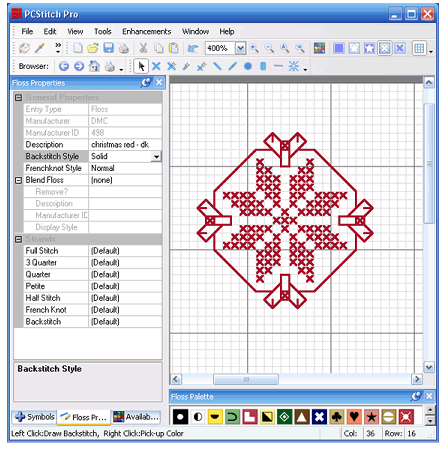
KNITTING AND CROCHET SPECIFIC USE: Can be used for standard colorwork mappings, and true type fonts (including the same knitting font mentioned yesterday) can be substituted for the symbol set. Symbols can be displayed on a color background and more than one symbol can be assigned to the same color. You can also override the program to assign more than one color to the same symbol. Like all graphing solutions not specific to knitting, there is no artificial intelligenge programmed in that would prevent building impossible to knit stitch configurations (this is rare even in the knitting world). Could handle block unit diagrams for linear filet or multi-color tapestry crochet, but even if one had a pre-made font for crochet symbols, this isn’t well suited for stitch graphing.
VERDICT: Handy for cross stitch but unremarkable for my intended uses. I don’t like the interface with the separate floss management program, or the way selection is handled.
PROGRESS AND USING STITCHING CHART PROGRAMS FOR GRAPHING KNITTING
In the middle of this charting program exploration I have had time to do a bit on my Clarke’s Law sampler. But first to answer a question. Aileen read my last couple of posts and wondered what I would consider a complex double running stitch pattern. I answer with pix of my current piece, plus a snippet of this pattern done up using Pattern Maker Pro, from yesterday’s review.

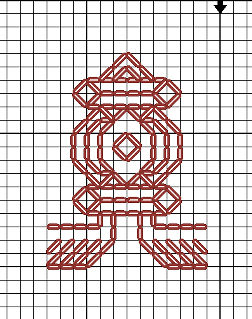
The nickel shows scale (click for better size shots of each). This strip is stitched using one strand of DMC floss, color #498 on 32 count linen (16 spi). Not particularly fine, but fine enough to show the patterns. The entire stitched area is about 15.75 inches across. From the top of the dark red twining strip to the bottom of the the D of ADVANCED is about 8.6 inches.

The top strip and the cross stitch words were all done using two floss strands. The outlining of the motif in the wide grape strip was done using two strands, and the squared background was done using one. (I’ve since found historical precedent for the squared background treatment).
All of the strips between the words will be relatively light in value, done in some combo of plain or voided double running stitch, but they won’t be as wide as the grapes (well, maybe the last one will be just to balance). I won’t do another dark band in long armed cross stitch (either foreground or voided) until after the entire quotation is done. I think it will take another three bands of text before the whole quotation is complete. Then I’ll fill out the cloth with a mix of styles, perhaps doing some in two-tone. It’s all fly by night here. I’ll also figure out something to eke out the line ends where the lettering comes up short. I think that NOT centering each line of text works better for my purposes, especially because I’m breaking text between lines in an unorthodox manner.
Now back to writing up the results of my stitch charting program explorations. Which for my knitting and crocheting readers, will have value. Either of the programs I described yesterday can be used to graph out colorwork repeats, or linear crochet (filet and tapestry styles). Pattern Maker Professional also allows you to assign a True Type knitting font (like the one from Aire River) to the symbol palette, and then using the program in symbols-on-graph mode, to compose knitting charts. Here’s a sample from PM showing a simple double 1×1 twist cable:

Where this falls apart though for knitting is if you try to display both colors and textures at the same time. The purl symbol will always be associated with one chosen color, the knit symbol with another. Although you can override the program and display more than one symbol per color, this program links symbol and color in a way that you can’t have multiple colors per symbol. Numbering rows is also problematic.
As I write up the rest of the sampled programs I’ll include their potential for use by knitters.
CHARTING SOFTWARE FOR DOUBLE RUNNING STITCH – PART 2
O.k. Let’s start looking at the various available charting packages, two at a time. Again, I’m not doing a full-on evaluation and comparison of every available capability. In particular I’m ignoring the import/translate capability that people use to turn standard graphics and photos into cross stitch designs. I’m looking at just one aspect of these tools – charting complex double running stitch patterns.
KG Chart LE for Cross Stitch by iktsoft v 1.09.06
PROS: First off, you can’t beat the price for this one. It’s freeware, no registration required. It presents output in both graphed and stitch simulated formats, and includes a DMC-based thread palette. The program is optimized for cross stitch, but it does contain a back stitch option that allows drawing straight stitches. Standard ouput in in-program composition mode appears to max out at 73×73 per printed page but mesh size can be manipulated to present more units per page (reducing down as far as legibility will permit and then some. Prints to paper (and PDF if a PDF writer is installed) and exports to JPG, PNG, TIFF, TGA, PCX, JPG-2000 and as pixel only to make icons.
CONS: Backstitch doesn’t present on screen in either mode as a series of countable, identifiable units. Yes, you can count the boxes over which the stitches travel, but that can be difficult, especially in low light or in dense patterns. While back stitch clusters can be selected and moved, inverting or mirroring them introduces errors – the replicated units don’t look like the original (plus transformation). Multiple page works are presented without repeats/overlaps for cross page orientation. Zoom is constrained to 8 set levels.


VERDICT: An excellent value for the casual cross-stitch user who wants to create multicolor block unit patterns and who may want to use the occasional outline or straight stitch unit. Not very useful to anyone composing entirely in double running.
Pattern Maker for Cross Stitch (Professional) by HobbyWare, Version 4
PROS: Back stitch and straight stitch have symbol sets that can be manipulated to display individual stitches (see settings in screen shot below). Units can be selected as part of a rectangular block or “lassoed” as a non-standard shape (Pro version only) and the selected or pasted bit can be mirrored/flipped/rotated with no loss of relationship among constituent units. Stitches can be represented on screen in floss-strand equivalent thickness units, and different stitches can use different thicknesses of thread. The thickness backstitch and straight stitch symbol representations can exist independent of floss thickness Output can be printed to hard copy, and mesh size can be manipulated to present as many per page as are legible. A dizzying array of available colors from most major floss and thread makers is included.
CONS: To show stitches as individual units, back and straight stitches need to be drawn one at a time. You can’t paint a line of them across multiple chart blocks and have each one neatly display as a separate unit. I can’t figure out how to display both cross stitch and line stitch symbols on the same view (I’d like to be able to show the line stitch units from the left hand picture and the color x units from the center pix on the same final image. Freehand “lasso” selection and export to JPG, TFF and other standard graphics formats are only available on the Pro version (JPG export shown in right image). The Pro version costs $120. US. The four day trial is a pain (those of us with careers may not have four linear days in which to make an adequate assessment of both versions).


VERDICT: A possibility, but pricey. Need to test it on a really complex bit of charting.
I’d appreciate hearing from others who are using any of these (or other) dedicated charting programs or who may be bending general purpose graphics programs to this need. Love a program? Have problems with one? Have hints/clues/insight into features/limitations? I’m sure that others would love to know, too.
CHARTING SOFTWARE FOR DOUBLE RUNNING STITCH – PART 1
I’ve got enough patterns now on tap that I should start thinking of how the follow on to The New Carolingian Modelbook should be composed. It’s been notional for a long time, with the tentative name of Ensamplio Atlantaea in honor of the other SCA region that took me in during my self-imposed absence from Carolingia.
Aside from having no publisher for this one, the biggest impediment is that I haven’t figured out how best to graph the patterns for publication. At this moment, I’m still bound to paper and pencil. The graphs in TNCM were made using my late, lamented Macintosh computers (a II and a IIcx); and Aldus Superpaint drawing/drafting software. We shifted over to the PC world long ago in response to the strain of keeping two parallel suites of hardware and software functional, and in response to the PC-centric nature of employment in this house.
To date, I’ve not found Windows based general graphics software that does as good a job for charting as the vintage-1990 stuff I used for my first book.
I’m still looking. I have an interim solution using MS Visio. It’s cumbersome, and time-consuming compared to my Superpaint method. In Superpaint I was able to establish a bitmap based graph as a separate field, then paint on lines set up with voids to correspond (in negative) with the dots of my background. So instead of painstakingly noting each individual stitch, I could run a length of stitches in one stroke and have those stitches neatly separated by voids to mark the length of each. For example, instead of a solid line four units long, I was able to paint a line that looked like it was broken up into four exact stitch length units, and do it on vertical, horizontal and diagonal planes. But in Visio I can’t do that. The best I can do is create several blocks, each with a line segment corresponding to a stitch (one side, two parallel side, two sides meeting at one corner, one diagonal, two diagonals, one diagonal and one side, etc.); then stack and rotate my blocks into my finished pattern. Although this method works well enough for block unit patterns it is excruciatingly slow for line unit designs, and compared to my old method is too tedious to use for a whole book.
So it’s back to exploring the world of commercially available charting software. There are several programs created expressly for needleworkers. However they’re not aimed at my needs, they’re all targeted at multicolor tapestry style cross stitchers, who are interested in styles that look more like needlepainting (creating multi-color pictures with stitch units corresponding roughly to the pixels in a raster display image) than in the linear and mostly monochrome styles I prefer.
To date I’ve looked at several programs including:
- Cross Stitch Professional, DPSoftware
- PC Stitch 9, M&R Technologies
- PatternMaker for Cross Stitch, HobbyWare
- Easy Cross, Fulford Software Solutions
- KG Chart LE for Cross Stitch, iktsoft
Mind you – remember I’m not looking at the features that most of the world wants in these cross stitch packages, notably the ability to turn JPGs or photos into cross stitch graphs, fidelity to a dizzying array of potential thread/color choices, or final output targeted at publishing complete patterns (with thread consumption and stitch symbol charts). I want something that will graph out double running stitch in a manner that enables stitchers to clearly discern the number of units in a long run, that allows easy selection/inversion/mirroring of pattern subunits or areas, and that otherwise eases production and use of of high complexity charts for double running or other similar linear stitching styles.
In mainstream graphics programs, I’ve been playing with Visio (described here) and Open Office Draw. I’m thinking of exploring the world of contemporary raster based Windows graphics programs next, but there has to be a better solution.
I’ll post detailed observations of these programs this week. Stay tuned. And if you have any suggestions for other Windows-based software that might suit my purpose, please let me know.
THE OLD CASTLE
UPDATE: THE OLD CASTLE GRAPH IS NOW AVAILABLE AS AN EASY TO PRINT PDF AT THE EMBROIDERY PATTERNS LINK, ABOVE.
Wandering around looking for designs to add to my growing Clarke’s Law sampler I stumbled across the needlework photo collection oft the State Hermitage Museum in St. Petersburg, Russia.
They have all sorts of fabulous things there including several items that may provide fodder for more bands on my current work.
But as I leafed through the collection one item in particular struck me. It’s no secret that I’ve had a long association with the Society for Creative Anachronism. Among my long time and dear friends I count many members of Clan Oldcastle. Their device (shamelessly borrowed from their website) is:

I was amazed to find a historical embroidery oh-so similar to that device. The original is a fragment of a larger piece, done in drawn thread embroidery. The museum’s accession info dates it to the late 16th/early 17th century, and gives it an Italian provenance. There’s a companion piece, too, with a boat, some rather blocky lions.
But it was the castle that excited me. Here’s a graph adapted from the museum artifact. Click on the thumbnail below to print a useful size.

I’ve made some minor changes but kept most of the imperfections of the original. My count is the same. The original looks a bit taller because its constituent units are not square. I’ve kept the not-quite symmetrical center tower, with the ornaments below the tower’s embattled top offered up skew to the rest of the count. I’ve substituted stars for the crosses on the original flags, and added two more of them for good measure. (Estoiles being of special heraldic importance in conjunction with the Oldcastle edifice). I’ve left the one at the top of the left hand tower closer to the original in shape for those who prefer them accurate, but added a bit of twinkle to the others. I also took the liberty of mentally fixing a bit of wear on the original on the open portcullis. But the rest is spot on.
I’d love to see anything made up from this pattern. It would be especially nifty in any of a dozen styles of counted thread embroidery, in Lacis, Burrato, or Filet Crochet; or in knit or tapestry crochet. Other non-textile applications include mosaic work and marquetry. And if you do use this pattern, please consider visiting the Clan Oldcastle link above, and using the address there to make a donation to the American Diabetes Association.
This one is going into Ensamplio Atlantaea (my growing sequel to The New Carolingian Modelbook) for sure, but I share it here first.
UPDATE, 6 APRIL 2020:
Spotted in the wild, another example of the Old Castle. This one is on a piece in the collection of the St. Gallen Textilmuseum, Accession 00671. Their listing cites it as being from Sicily, dated 1590-1610.

Technorati : crochet, embroidery, knitting
STITCHING STORIES
More babbling on here today.
Faithful Reader TexAnne noted my mention yesterday of the “print to transparency” cheat for flipping charted patterns and added another that I had forgotten. Some printer drivers and photocopiers allow you to mirror-image their output. This option is most accessible in the Mac world. I remember my late, lamented Macs having a prominent command in the print dialog that allowed mirror-image printing, something that came in handy for printing out driving directions. I’d print them out in a large font in mirror image and lay them on the dashboard of my car. They were just visible as a right-side reflection on the windshield in front of me, and acted as a “heads-up” display.
Since TexAnne’s note I’ve tinkered with the print dialogs of several PC world printers from HP and others, plus some large office photocopiers, and in most of them I’ve found a buried “Print Mirror Image” command. It’s usually on an “Advanced Commands” tab that summarizes the state of all available printer options, but it’s not often displayed as an easy to get to setting. But it’s usually there somewhere. Scan to print or printing mirror image is a matter of finding and setting this hidden command. It’s another useful way to use technology do do a mirror image chart flip.
Long Time Needlework Pal Kathryn reminded me of a story connected with the pattern I’m stitching now.
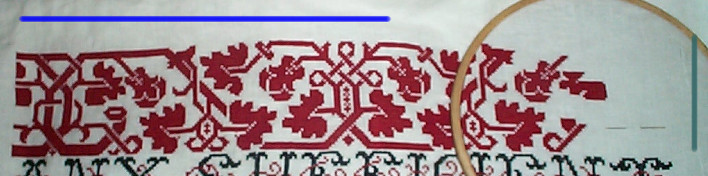

Back when I was working it voided on the Think sampler (lower band, shown flipped to the same orientation as the current work for comparison) I did lots of stitching (and knitting) in public. I worked in the Washington, D.C. area, and would take my projects outside at lunch and do them on park benches. I wrote to Kathryn that one day an elderly lady and her granddaughter approached me. They were of Hmong ancestry, a Southeast Asian people with a rich heritage of traditional counted cross stitch embroidery. With the granddaughter translating, the lady admired the work and asked if the pattern was traditional to my home village or family. I thanked them for their compliments and said that sadly, Brooklyn, NY did not have its own embroidery tradition, and that I’d found the pattern in a book. Kathryn says she’s thought of this particular design as “the Brooklyn Pattern” ever since.
 String-Or-Nothing

