STITCH BY STITCH
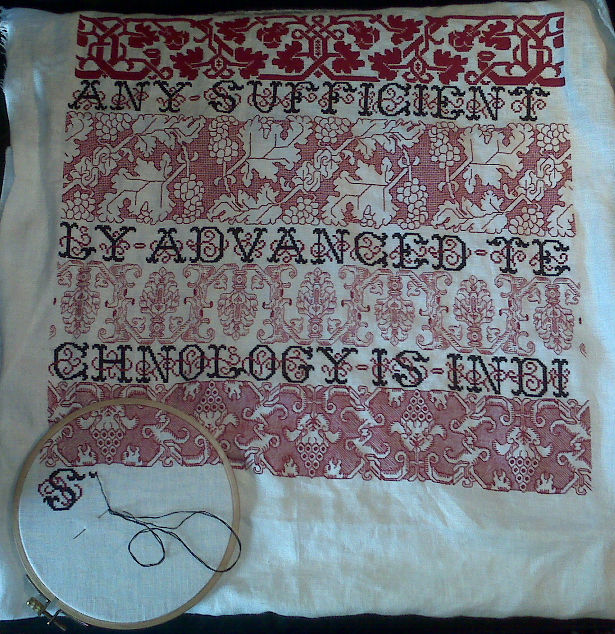
Hobbled as I am by lack of time (work has invaded every corner of my life), I haven’t had much time to do much stitching. Ten days since the last progress point and I’ve only managed to finish out a postage stamp sized area on the last strip and to begin the next row of letters:
For WindyRidge who asked for a close-up, here’s the hops flower panel:

After a couple of cursory searches for these embroidery styles on line, I’m beginning to get the feeling that not too many ‘net-enabled stitchers are playing with them. There are folks doing double running stitch and voided embroidery to be sure, but not from patterns of this complexity or vintage. If there are any of you out there I’d love to hear from you; especially if you’re composing new works incorporating patterns from historical sources, as opposed to working up samplers designed by others. While working up pre-designed samplers is a pursuit of high order, it doesn’t face the same sort of problems as original collation/composition. Those are the problems I’m most interested in right now.
HOPPING ALONG
Through it all progress is being made. I do try to grab 10 minutes at lunch and another half hour in the evenings to decompress. Plus two weekends ago I had an actual half-day off on Saturday. My most recent strip is growing. I’ve got one more hops flower to go on the right hand edge, then it’s back to more lettering:

This is a strange strip to be sure. You can see the similarity between this and the plume flowers strip:
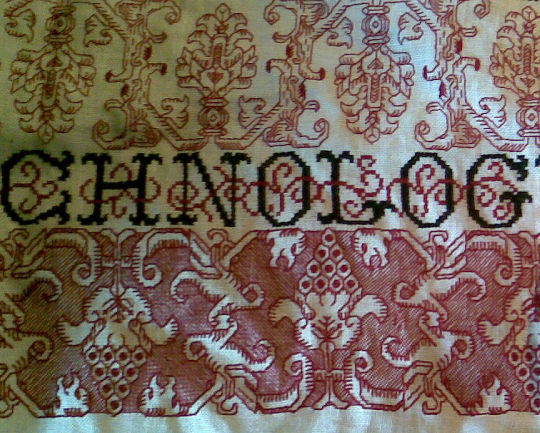
Both feature the same type of up/down symmetry, with a center vaguely vegetal motif separated by mirrored stem-like surrounds. Both use small parallel stitches on the inside edges of the motif as shading. Both combine flat decoration (the sprig at the center of this strip’s flower’s base, and a similar sprig in the same spot on the plumes), with more rounded, natural forms. And both sport a sort of baroque exuberance and total unconcern with true plant shapes. Not unsurprising since both of these were cribbed from the same source sampler.
It is interesting though to see how variants in working method change the look. The plumes were done in one strand of floss, the hops flowers outlines in two, with the background of the latter in one strand. Although detail in the two strips is roughly comparable, and if anything the plumes have MORE detail than the current strip, the plumes are lighter and airier. The current strip is by contrast, meaty looking. Those ocarina like turnip things on the stem divides are particularly fleshy, in a somewhat unsettling way.
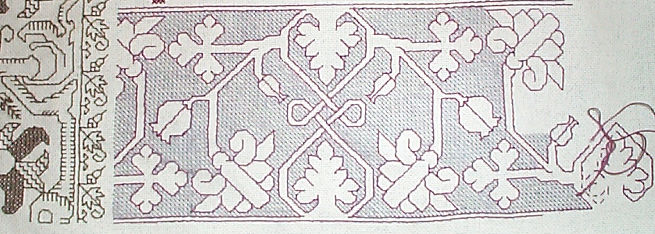
I’m not sure what the strip after the next bit of lettering will be. I am considering a bastard mutation of two blackwork styles – perhaps working an outline for a very open and unadorned long repeat strip similar to this one:
But instead of working the background, working the foreground as if it were one of the freehand inhabited blackwork styles, similar to this:

Not sure yet, but with no historical accuracy constraints on this piece, why not?
CASKETS AND SNAILS
Spring floods here. A minor one in the basement, brought on by the inordinate amount of rain we’ve had in this area this month, and at work, with more deadlines rushing one upon the other. Which must be good for business, but is exhausting none the less.
Last post I promised two things. The first one is a dream project. Something I will probably never have the time or resources to accomplish (especially the time): my own embroidered casket. Not the kind you’re thinking of.
Back in the 1600s the crowning achievement of what passed for female education was the completion of a small box covered with embroidery. These were called cabinets or caskets, and often featured dimensional embroidery. They were about the size of a large tabletop jewelry box and were truly spectacular. The Peabody Essex museum in Salem has one one dated to 1655.. Here’s a particularly nice one in the Minneapolis Institute of Art’s collection. They’re highly sought after by collectors.
Via Needleprint, I stumbled across this:

It’s a modern chest base, made by a woodworker specifically for creating cabinets. If you click on the link you’ll see that the individual panels are made to be removed. All that needs to be done is stitch up a piece of the correct dimension and lace it onto the panel, then refit the panel into the cabinet. Now all I need do is set aside two years, a pile of silks and metal threads, some excellent linen, and $800 for the box base (including shipping). Another item on my ever growing never-never list…
The second thing I promised was word of a snail invasion in the Antipodes. Again, not the kind you’re thinking of. Garden plantings are safe. But Friend-of-Friend Fred Curtis, resident in Australia happened upon my book and is doing all manner of happy things with my snails. Here’s a trial for a man’s necktie to be covered with snails. He also stitched a camera straps using TNCM patterns (shown in process), and has used another of its patterns on a baby bib. But back to the snails. Here’s another of his pieces, offering up early spring inspiration to those of us in the Northern Hemisphere.

(Photo reproduced with permission). I’m always tickled to see stuff worked up from patterns I’ve posted, both for knitting and embroidery. If you’d like to see them posted here in the Gallery, please feel free to send me an image or a link. Fred – thanks for the smile!
STRIP BY STRIP
Poking my head up from yet another marathon sprint at work here. With promise of another one hard on the heels of the last, I’m probably surfacing just long enough to note limited progress on my sampler and report other news.
First the progress:
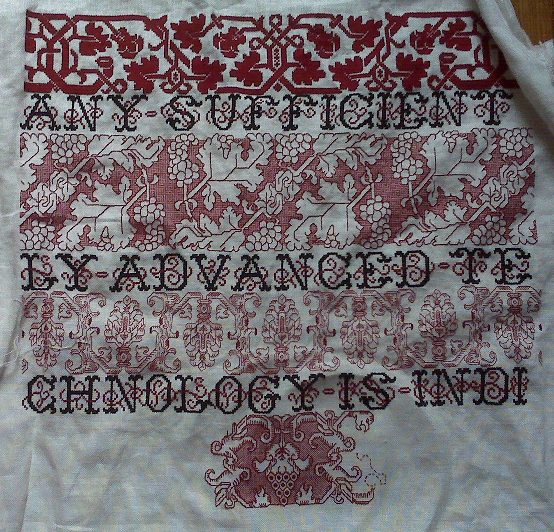

You can see that I’ve completed another row of text, and I’m on to another double running stitch panel. I’m working this one voided too. It’s a mishmash, with the bulk of the elements taken verbatim from the sampler that provided the previous strip. The hops flower(?) and the strange ocarina-like turnip things on the side are direct quotes. The finials on either side of the hops flower were very difficult to copy though, so I took the liberty of substituting bird heads for them. Lots of patterns of this style/era include animals, humans or birds (all or in part) sprouting from vegetation. My treatment of the voided area is however a total flight of fancy. I chose to use half-cross stitch, massed into a field of diagonal lines. I used a diagonal fill on the Do-Right sampler, too:
Unlike the graph paper like squared fill I on the grapes strip, I haven’t seen historical precedent for the diagonal line treatment. But it’s not totally illogical. If you’ve seen an artifact worked this way, please let me know. Other unusual treatments of the voiding include working the background narrower than the foreground and the direction of my diagonals. I’ve only seen one historical piece worked this way – a late 16th early 17th century panel photographed in Cavallo’s Needlework. I graphed that one out, it’s in TNCM on Plate 74:1 – I worked a bit of it a while back, and am considering doing it again on this piece:

Mirroring the diagonals on either side of the central motif is new. I haven’t done this before, and I’ve never seen it done on any other piece. Again – I can’t claim originality, there’s only so many ways to do things in needlework, and it’s a sure bet that the most obvious have been tried before. One last thing I’m planning on doing is NOT filling in the voiding in the background behind the little triangular areas above and below the strange, mutant turnip things. That will make the central hops flower motifs on their lozenges of darker background look a bit like a series of very large beads.
Given my impossible work schedule, the stitching density of both the foreground motif (again worked with two threads of my DMC floss), and the background (worked with one thread), this panel should take me quite a while. After this one comes the rest of my quote. So far I’ve stitched “Any sufficiently advanced technology is indi-” Next comes “-stinguishable from magic. In all probability, the “magic” won’t fit on the next line of text. I’ll deal with that problem when I get there.
Next post – snails in the Antipodes! My dream casket! (Not the kind you’re thinking of…) Stay tuned.
KNITITNG NEEDLE SIZES – REPOST
I went looking for this info on the site but apparently when we moved to this location from the old Blog City address, it all squirted out into the ether. Hope that this is still helpful.
KNITTING NEEDLES – PART V, TRUE SIZES BY MAKER, originally posted 25 June 2005
Still working on the needle characteristics summaries. In the mean time, here’s something else somewhat useful – a cross-maker chart of needle sizes.
This chart lists modern needles only, and should hold true for both straights and circs of the same line made by the same manufacturer. I will keep adding manufacturers, plus I will also go through my collection of older needles and post sizes. But not today…
<
| Absolute Metric Size |
Addi Turbo |
Inox Express |
All Bates |
Brittany | Boye | Crystal Palace |
Clover Bamboo |
| 0.5mm | |||||||
| 0.75mm | |||||||
| 1.0mm | |||||||
| 1.25mm | 0000 | 0000 | |||||
| 1.5mm | 000 | 000 | |||||
| 1.75mm | 00 | 00 | |||||
| 2.0mm | 0 | 0 | 0 | 0 | 0 | ||
| 2.25mm | 1 | 1 | 1 | 1 | 1 | ||
| 2.5mm | 1 | 1.5 | 1.5 | ||||
| 2.75mm | 2 | 2 | 2 | 2 | 2 | ||
| 3.0mm | 2 | X | 2.5 | 2.5 | |||
| 3.15mm | 3 | ||||||
| 3.25mm | 3 | 3 | 3 | 3 | 3 | 3 | |
| 3.5mm | 4 | 4 | 4 | 4 | 4 | 4 | 4 |
| 3.75mm | 5 | 5 | 5 | 5 | 5 | 5 | 5 |
| 4.0mm | 6 | 6 | 6 | ||||
| 4.25mm | 6 | 6 | 6 | 6 | |||
| 4.5mm | 7 | 7 | 7 | 7 | 7 | 7 | 7 |
| 4.75mm | |||||||
| 5.0mm | 8 | 8 | 8 | 8 | 8 | 8 | 8 |
| 5.25mm | 9 | ||||||
| 5.5mm | 9 | 9 | 9 | 9 | 9 | 9 | |
| 5.75mm | 10 | ||||||
| 6.0mm | 10 | 10 | 10 | 10 | 10 | 10 | |
| 6.5mm | 10.5 | 10.5 | 10.5 | 10.5 | 10.5 | ||
| 7.0mm | 10.5 | 10.75 | 10 7/8 | 10.75 | |||
| 7.5mm | 10.5* | ||||||
| 8.0mm | 11 | 11 | 11 | 11 | 11 | 11 | 11 |
| 8.5mm | |||||||
| 9.0mm | 13 | 13 | 13 | 13 | 13 | 13 | 13 |
| 10mm | 15 | 15 | 15 | 15 | 15 | 15 | 15 |
| 12mm | 17 | 17 | 17 | 17 | |||
| 12.5mm | 17 | ||||||
| 14mm | |||||||
| 15mm | 19 | 19 | 19 | ||||
| 15.5mm | |||||||
| 15.63mm | 19 | ||||||
| 19mm | 35 | ||||||
| 25mm | 20 | 50 | |||||
| 34mm | 20 | ||||||
| 36mm | 20 |
An “X” indicates that this size is made, but has no US marked equivalent.
*7.5mm Addi Turbos are available in Canada, and are sometimes marked (or marketed) as US #10.5.
KNITTING NEEDLES – PART VI: CIRCULAR LENGTHS – originally posted 23 June 2005
As promised, here’s a chart showing the circular needle lengths available from commonly listed (and some not so commonly listed) manufacturers. I’ve compiled this from on-line catalog sources. In the case a manufacturer had a web page, that info trumped what I could find in catalogs. Centimeter equivalents are rounded off to the nearest whole unit, except for the 16″ size. Various catalogs list 16″ needles as being either 40 or 41cm.
| 11″ 28cm |
12″ 30cm |
16″ 40-41cm |
20″ 50cm |
24″ 60cm |
26″ 66cm |
29″ 74cm |
32″ 80cm |
35″ 89cm |
36″ 91cm |
39″ 99cm |
40″ 100cm |
47″ 120cm |
48″ 122cm |
60″ 152cm |
|
| Addi Natura Bamboo | x | x | x | x | |||||||||||
| Addi Plastic | x | ||||||||||||||
| Addi Turbo | x | x | x | x | x | x | x | x | |||||||
| Balene | x | x | |||||||||||||
| Bates Quicksilver | x | x | x | x | x | ||||||||||
| Bates Silvalume | x | x | x | x | |||||||||||
| Bates Silverado | x | x | x | x | |||||||||||
| Boye | x | x | x | ||||||||||||
| Clover Bamboo | x | x | x | x | |||||||||||
| Crystal Palace Bamboo | x | x | x | ||||||||||||
| Hiyahiya Nickel-free Steel | x | x | x | x | x | ||||||||||
| Inox (Grey) | x | x | x | x | x | ||||||||||
| Inox Express | x | x | x | x | |||||||||||
| Noble Nickels | x | x | x | x | |||||||||||
| Plymouth Bamboo | x | x | |||||||||||||
| Pony Pearl | x | x | x | ||||||||||||
| Suzanne Ebony | x | x | x | ||||||||||||
| Suzanne Rosewood | x | x | x | ||||||||||||
| The Collection Wood | x | x |
SUBTLE AND QUICK TO ANGER
While my current work languishes, here’s a picture of another past sampler. This one I stitched in 1996. It hangs in my husband’s office:
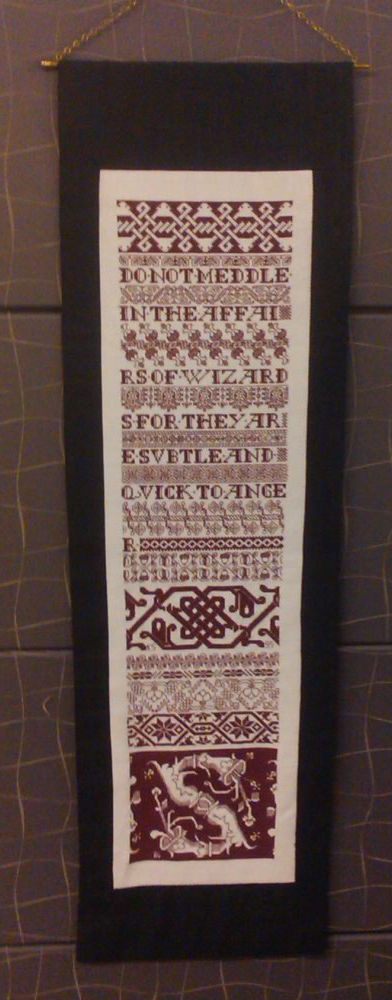
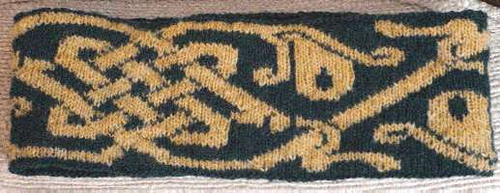
Again most of the patterns are from The New Carolingian Modelbook, and the piece is a mix of plain old cross stitch, long armed cross stitch, and double running stitch, worked in DMC embroidery floss on 36 threads per inch linen (18 stitches per inch). The center twist is the same one I used on the knitted Knot a Hat earwarmer band. (It’s also pictured on Ravelry.) You can see the difference in proportion between square unit based long-armed cross stitch, and the not quite square knitting stitch units. More rows to the inch than stitches across to the inch gives the knit version the slightly squashed appearance.
UPDATES: THE CHARTED PATTERN BELOW IS ALSO AVAILABLE IN AN EASY-TO-PRINT PDF DOWNLOAD ON MY EMBROIDERY PATTERNS PAGE, LINK ABOVE. AND THE KNOT-A-HAT KNIT EARWARMER PATTERN IS AVAILABLE ON THE KNITTING PATTERNS PAGE, ALSO LINK ABOVE.
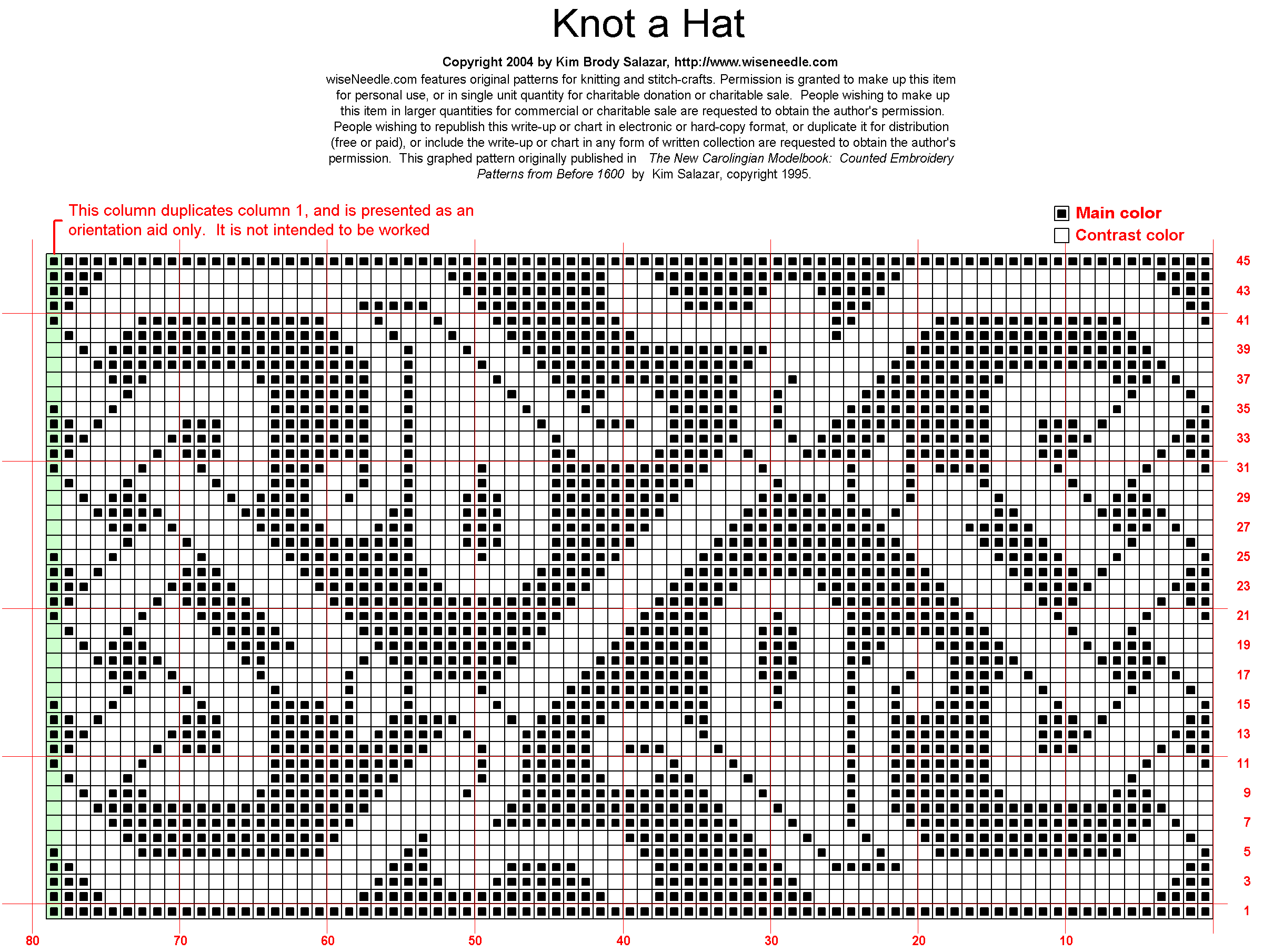
The quotation on this sampler is “Do not meddle in the affairs of wizards, for the are subtle and quick to anger.” From JRR Tolkien’s Lord of the Rings, and totally appropriate for a software developer.
PLUME FLOWERS FINISHED
Work has a nasty way of eliminating any discretionary time whatsoever, but five minutes here and 20 minutes there, I have finally managed to finish the plume flower double running strip:

On to the next band of lettering, and on to thinking about what to do after that one is done. The current rate of production coupled with a workload that promises to double again in the coming month will give me ample time for that bit of consideration.
I hope to resume my explorations into charting software possibilities. I’ve got an itch to publish more patterns (including the just-completed strip), but without tools and time it’s just not happening.
STITCHING AND VISUAL DENSITY
Charlotte asks about the colors of the bands on the Clarke’s Law sampler. She says that each successive band looks lighter than the one before. I answer:
So far I’ve used only two colors of embroidery floss – DMC Red #498 and DMC Black #310. The top band was done in long-armed cross stitch, using two strands of red. Long armed cross stitch produces a particularly dense and raised texture.

Outlines on the grapes band were worked in double running stitch using two strands of the red, but the background grid filling was done in one strand – also in double running.

The current plume flower band is worked in double running using just one strand.

Between the relative densities of the various source patterns and the density of the working methods I’ve ended up with the progressively lighter look for each band even though all are worked using the same thread.
My plan for the rest of the bands is to do more of the double running work, choosing bands of different visual densities and working some but not all of them voided (with a background fill, but not necessarily solid). The next one will probably be somewhat closer in look to the grapes panel, but in between that and the current band in darkness. I will alternate bands of various densities with the black lettering. I’ve used plain old cross stitch for both the letters and the red embellishing squiggles that loop around the letters. If you compare it to the long armed cross stitch snippet above you can see the difference in coverage between the two.

When all of the lettering is done I’ll consider working more long armed cross stitch. Depending on how much room is left on the cloth, I might just go for broke with one massively large pattern, working it voided, so that the piece has a nice dense anchoring segment at the bottom. Or there might be a couple of bands of progressively darker stitching leading up to it. I haven’t chosen the patterns yet and I’m not sure exactly how much room I’ve got, so you’ll have to stay tuned to see how it all works out.
To answer Ellis – the reason you can’t see any lines drawn on on the linen for stitching over is because there aren’t any. This piece is done on the count. I’m using the weave of the linen as my guide, copying patterns drawn out on graph paper, with each grid of the graph paper corresponding to square of 2×2 threads.
To answer Marya – if my pattern contains a straight line that spans two or more graph units I do not make one big stitch over all of them. I make an individual stitch for each grid unit, even if they are all in one straight line. This keeps the work neater and more true to the graphed original. Long stitches are also more likely to catch on things.
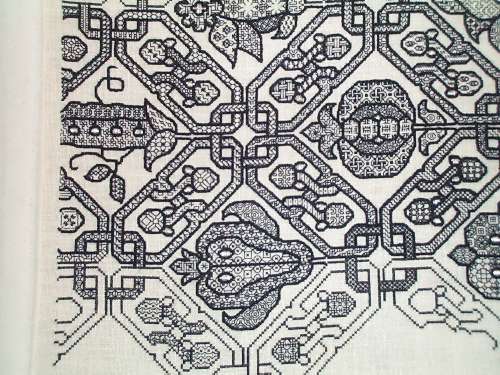
To answer [anonymous] who noted that all of these patterns seem to rely on just 90 and 45 degree angles – yes, you’re right. I can’t rule out totally that diagonals over a 1×2 grid unit weren’t used (30/60 degrees), but so far I haven’t found a historical piece that used them in this type of pattern. It’s possible that some in-filled blackwork diaper patterns (the dark outline, different geometric filling variant seen below) used stitches at those angles, but I haven’t had the luxury of examining enough historical works close-up to make that determination. Lots of modern blackwork does use those angles. But for me, I’ll stick to the orthodox and limit my design to 45s and 90s.
BAND THREE ALMOST DONE
Apologies to the person out there anxiously awaiting the rest of my charting review series. I’ve had a serious attack of work obligations that has eaten into all time not spent sleeping. Even family maintenance has been scaled back. Blogging and research for blogging is right out. But for all of that, I do reserve to myself a half hour in the evenings for de-stressing. So I do have some progress to show on my Clarke’s Law sampler:

When this band of plume flowers and branches is done I do the next line of text. At the current rate of life-obfuscation, I won’t have to worry about picking the next band pattern for weeks yet to come.
Sigh.
STILL STITCHING
I’m still working on my round-up of charting software reviews. I’ve got three or so more dedicated programs to try, and then I’ll attempt to bend standard graphics programs to my use. In the mean time, work eats at my life. I did get a little bit of time to stitch while we were watching the Olympics yesterday. Here’s the result of that hour plus the prior week’s worth of dinking around on my Clarke’s Law sampler:

Complex, but in a blocky, heavy-torso, post Renaissance way, kind of delicate. It makes the grape border above the line of text seem meaty by comparison. This strip is mostly reversible. Some small bits like the diamond in the center of the plume/flower’s base and the bark texture lines are discontinuous, and I didn’t bother to either start or finish off my threads invisibly. But with a bit of tinkering to norm the non-attached bits of detail, there’s no reason why this pattern couldn’t be worked totally two-sided.
For those of you who are thumbing through TNCM looking for this one, it’s not in there. It’s part of the set I’m grooming for the next book. If the investigations into a feasible charting method ever pay off…
 String-Or-Nothing


